Your account, your keys
Axiom runs on the Claude, OpenAI or other subscription you already have. It never buys anything for you.
Axiom — our own product
Axiom turns your Claude Code, Codex or OpenCode into a project lead that builds software with you, in plain words — and runs the work in reviewed stages, each one checked before it reaches you.
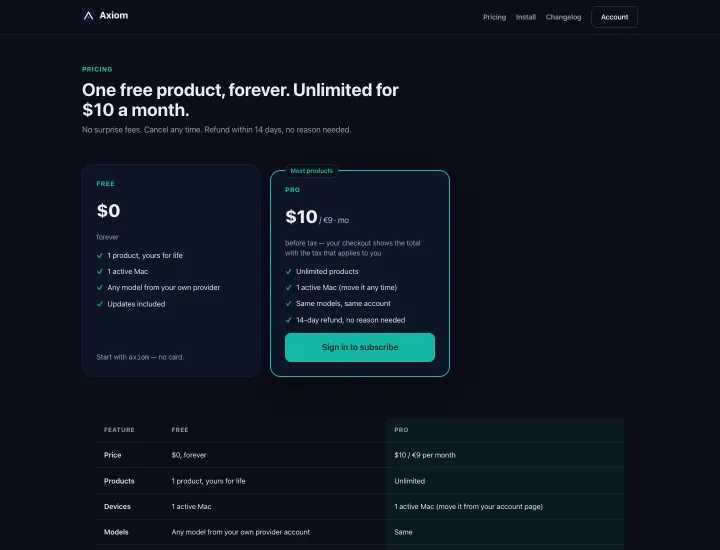
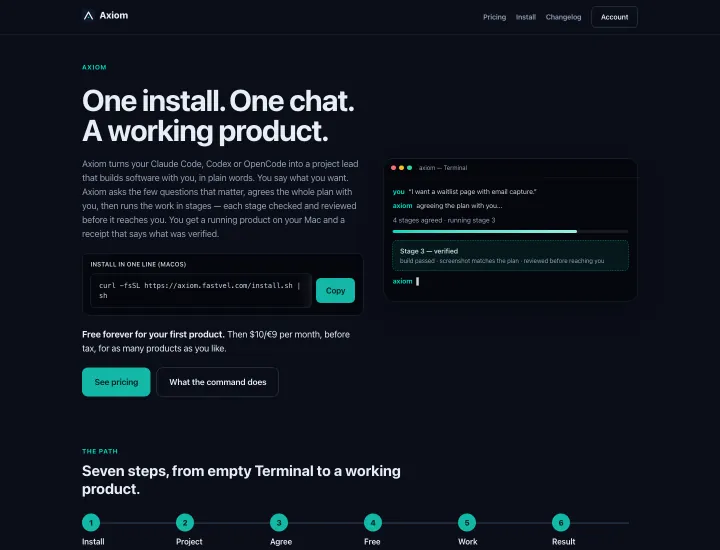
axiom.fastvel.com — home and pricing
The product
Axiom runs on the Claude, OpenAI or other subscription you already have. It never buys anything for you.
Type axiom, then talk: "I want a new product", "here is my folder", "let's continue".
A restore point before each change, with rollback available in one sentence.
The best model your provider offers, or the next one down — your choice, switchable mid-chat.
The path
One line in Terminal on macOS 13 or newer: curl -fsSL https://axiom.fastvel.com/install.sh | sh. No sudo, no edits to your shell configuration.
Run axiom in any folder. On first start it asks for your email code and binds Axiom to this Mac.
Describe the result in plain words — Axiom asks the few questions that matter about the result, trade-offs and money, never about engineering.
Axiom proposes the whole plan and agrees it with you before any stage begins.
The work runs in stages; each stage is checked and reviewed before it reaches you, with a restore point ahead of every change.
Close the terminal any time and say "let's continue" later — Axiom restores the plan, the unfinished stages and the decisions you made.
You get a working product on your own Mac and a receipt that says what was verified at each stage.
Pricing
Free forever for your first product. Then $10/month (≈€9, before tax) for as many products as you like.
$0, forever
$10/month
Before Axiom writes the first line of code for your first product, it tells you plainly that this becomes your free product forever and cannot be replaced, and asks you to confirm. A promo code can unlock extra products at no cost. The price shown is before tax; checkout displays the total with the tax that applies to you.
Install
macOS 13 or newer · one line in Terminal
curl -fsSL https://axiom.fastvel.com/install.sh | shRequires macOS 13 or newer and one of Claude Code, Codex or OpenCode already installed and signed in. The installer sets up its own isolated environment, finds your installed tool, and writes an install receipt — no sudo, no shell configuration changes.
FAQ
No. You describe the result; Axiom asks about the result, trade-offs and money — never about engineering.
Yours. Axiom starts your own Claude Code, Codex or OpenCode with its configuration; your subscription limits and keys stay with you.
Your code goes only to the AI provider you already use, through your own account. Axiom's own server sees your account, device and subscription — not your code.
macOS for now. Windows and Linux follow.
Axiom
Then $10/month (≈€9, before tax) for as many products as you like.